

Payin offers two collection modes: online collection (this page) — collecting from end users via API / Checkout; and manual acquiring — collecting through fixed deposit addresses created in the dashboard. For the offline mode, see Manual Acquiring.
Business Flow
Sequence Diagram
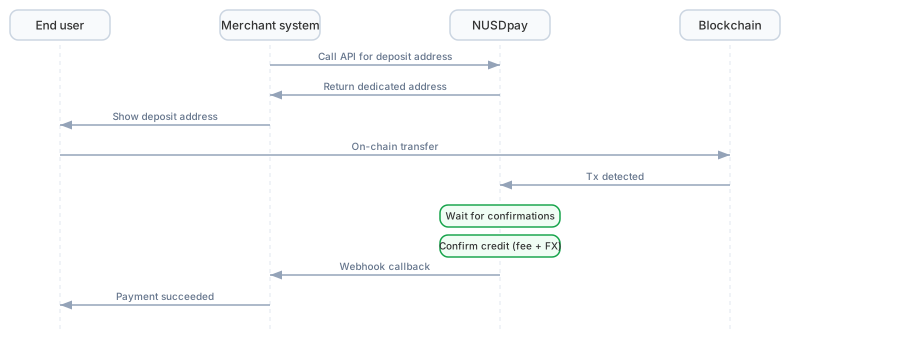
Payin sequence diagram (click to enlarge)
Operation Steps
1
Get the deposit address
The merchant calls the Get Deposit Address API to obtain a dedicated deposit address. The deposit address is fixed for a given merchant on a given chain.
2
Display to end users
The merchant displays the deposit address and amount on its own payment page (or integrates the Checkout Cashier to provide a ready-made H5 payment page).
3
End user pays
The end user transfers supported tokens such as USDT or USDC to the address from their own wallet.
4
Automatic crediting
After the NUSDpay system detects the on-chain transaction, it waits for sufficient block confirmations, then credits the merchant wallet in NUSD after exchange rate conversion.Credit amount calculation:
5
Webhook notification
After crediting is complete, the system pushes a Deposit Callback event to the merchant containing the transaction hash, amount, token, and other complete information.
Crediting Rules
Supported Tokens
Use Get Supported Tokens to query the currently supported deposit tokens. Main supported tokens:- USDT: Ethereum, Tron, Arbitrum, Polygon, BSC, Base
- USDC: Ethereum, Arbitrum, Polygon, BSC, Base
Pricing and Conversion
USDT, USDC, and other tokens deposited by end users are uniformly converted to NUSD and credited to the merchant wallet:The actual exchange rate and service fee for each transaction can be queried in the deposit record and are also returned via the Webhook callback.
Confirmation Time
Block confirmation times vary by chain:Deposit Status
Exceptions
Wrong Token Deposit
If an end user sends an unsupported token to the deposit address (e.g., the platform only supports USDT but the user transfers ETH), the deposit will not be credited automatically. The merchant can submit a mistaken deposit refund application through the Ticket System in the admin console.Small Deposits
Extremely small deposits (such as a few cents) will be credited normally. If you need to filter out small deposits, handle this at the business layer.Deposit Not Credited
If the end user has initiated a transfer but the merchant has not received a Webhook notification:- Confirm whether the transaction is on-chain (query via a blockchain explorer)
- Confirm whether the Webhook endpoint is responding properly
- Call the Transaction Records API to query proactively
Next Steps
Manual Acquiring Solution
Collect offline through fixed deposit addresses.
Payout Solution
Learn how to initiate payments to external addresses.