

Use Cases
- Agent / channel top-ups: fixed partners transferring to the same address over time
- Offline settlement: periodic large transfers settled offline with partners
- Manual collection: any collection that cannot go through an online payment page but still needs automatic crediting and reconciliation
Business Flow
Sequence Diagram
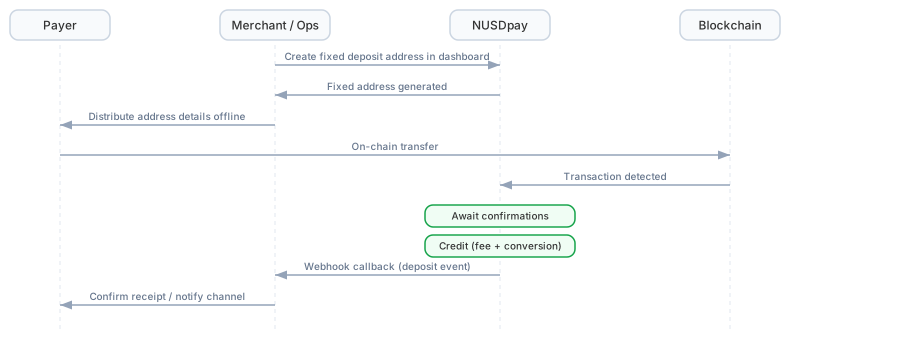
Manual acquiring sequence (click to enlarge)
Operation Steps
1
Create fixed deposit addresses
In the dashboard’s Address Management, create an address: pick the chain and fill in a description (we recommend naming by region/channel/purpose, e.g.
EU_Channel_A). Create as many addresses as the business requires; each address is unique and remains usable as long as its wallet and chain stay enabled.2
Distribute addresses offline
Hand the chain + address + description to operations, who distribute them to the corresponding payers.
3
Payer transfers funds
The payer transfers USDT or other supported tokens to the fixed address (same range as online Payin — see Supported Tokens).
4
Automatic crediting
NUSDpay detects the on-chain transaction, waits for block confirmations, and credits the deposit. Crediting rules (confirmations, exchange rate conversion, service fees) are identical to online Payin.
5
Webhook notification
Once credited, the system pushes the standard Deposit Callback event — same channel and same structure as online deposits, so merchants reuse their existing deposit-handling code. See Deposit Callback · Manual acquiring for integration details.
6
Orders and settlement
Orders are visible in the dashboard’s Deposit History; settlement rules are identical to online Payin (merchant-initiated with platform review) — see Settlement.
Acquiring Wallet and Fund Accounting
Manual acquiring uses a dedicated project acquiring wallet, with balance and billing accounted separately from the online Payin wallet.- NUSDpay provides each project’s acquiring wallet ID during onboarding
data.wallet_idin Webhook events is this wallet ID (an existing field); merchants use it to distinguish offline from online orders and route accordingly
Notes
Next Steps
Deposit Callback
Webhook event structure, crediting logic, and field mapping.
Address Management
Create and manage fixed deposit addresses in the dashboard.