

Use Cases
- Funding: Transfer NUSD received via Payin to the Payout wallet to ensure sufficient balance for upcoming payments
- Inter-project allocation: When operating multiple projects, flexibly allocate funds between project wallets
- Fund consolidation: Consolidate NUSD scattered across projects into a master wallet for unified management
Business Flow
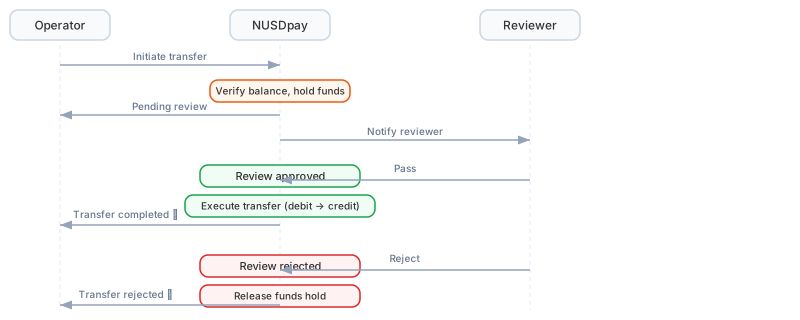
Transfer flow sequence (click to enlarge)
Operation Instructions
Through the Admin Console
1
Go to the Transfer page
Log in to the admin console, go to the Transfer Records page, and click the Transfer button in the top right.
2
Fill in transfer information
- From: Auto-filled with the current project wallet (not modifiable)
- To: Enter the target wallet ID
- Amount: Enter the NUSD amount to transfer (not exceeding the available transferable balance)
3
Submit and wait for review
After submission, the transfer enters the pending review state. It is executed automatically once the Super Admin approves the review.
Transfer Status
Permission Notes
Next Steps
Payout Solution
Learn how to use transferred funds to initiate payments.
Settlement and Reconciliation
Learn about transaction settlement and reconciliation files.