

Key difference: with an on-chain payout (Withdraw), the funds actually leave NUSDpay and move on-chain to an external address; with an in-platform payout (Transfer), the funds always stay inside NUSDpay and only change wallet ownership. Use the former to pay on-chain crypto wallets, and the latter to pay recipients within the NUSD system.
1. On-chain payout (Withdraw)
Initiate a cryptocurrency payment to an external on-chain wallet address, transferred over the blockchain network. Suitable for withdrawals, revenue sharing, and refunds to crypto wallets.Sequence Diagram
The following shows the complete lifecycle of an on-chain payout (Withdraw) transaction: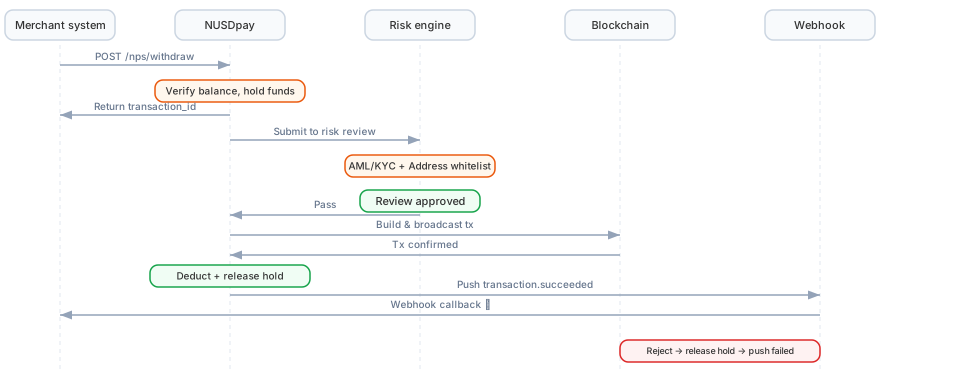
Payout sequence diagram (click to enlarge)
Operation Steps
1
Check token availability and fees
Before initiating a withdrawal, call GET /nps/configs (Platform configuration) to confirm that the target token’s
can_withdraw is true, and read the current fees (fee_ratio / fee_fixed).2
Initiate the withdrawal request
Call the POST /nps/withdraw/onchain API, passing the recipient on-chain address, amount, chain, and token.
3
System validation and freezing
The NUSDpay system performs the following validations:
- Whether the balance is sufficient (including fees)
- Whether the chain and token are supported
- Whether the recipient address format is valid
4
Risk control review
The transaction enters the risk control workflow:
- AML/KYC review: Anti-money laundering and customer identity verification
- Address allowlist check: Whether the recipient address is in the allowlist
- Risk control rule engine: Whether the transaction amount, frequency, etc., trigger risk control rules
5
On-chain broadcast and confirmation
After the review passes, the system constructs the on-chain transaction and broadcasts it to the blockchain network. After block confirmation, the transaction is complete.
6
Webhook notification
After the transaction is complete, the system pushes a withdrawal result event to the Webhook URL configured by the merchant. See Withdraw Webhook.
2. In-platform payout (Transfer)
Pay a wallet inside the NUSDpay system (such as a NUSD Wallet end user). Funds move from one wallet to another within the ledger — instant, off-chain, and gas-free — suitable for paying NUSD Wallet users and inter-project settlement.Sequence Diagram
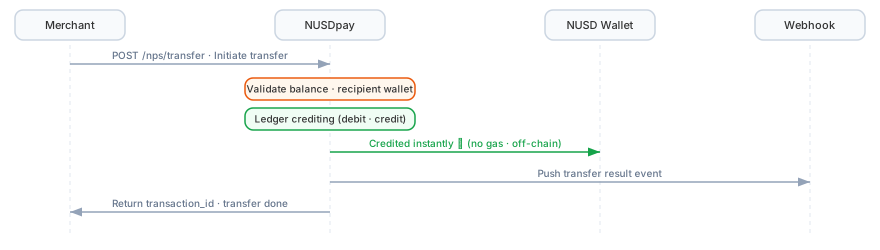
In-platform payout (Transfer) sequence (click to enlarge)
Operation Steps
1
Initiate the transfer request
Call the POST /nps/withdraw/internal API, passing the source wallet, destination wallet, and amount. Unlike a withdrawal, a transfer does not require a chain or token (because it is off-chain).
user_token, user_email, user_phone, user_name, and notes are optional: when the recipient is a NUSD Wallet end user, use user_token to specify the corresponding app user, user_email and user_phone to record the recipient’s email address and phone number, user_name to record the recipient’s name, and notes for the purpose.2
System validation
NUSDpay validates that the source wallet has sufficient available balance and that the destination wallet is valid.
3
In-platform ledger crediting
After validation passes, the amount is deducted from
wallet_from’s available balance and credited to wallet_to in real time. No on-chain transaction is constructed; no block confirmation; no gas fee.4
Webhook notification
After the transfer is complete, the system pushes a transfer result event to the Webhook URL configured by the merchant. See Transfer Webhook.
Fund Flow
Balance Model
The merchant wallet balance is divided into two parts:
Balance change example (on-chain withdrawal):
In-platform payout (Transfer) settles within the ledger in real time: the amount is deducted directly from the source wallet’s available balance and credited to the destination wallet, generally without an intermediate “frozen” state.
Funding Modes
Payout funds come from the merchant’s NUSD wallet balance. Merchants need to ensure the wallet has sufficient available NUSD balance. There are two ways to fund:- Option 1: Internal transfer — Use an in-platform transfer to move NUSD from another project wallet of the merchant (such as a Payin wallet) to the payout wallet (see Transfer Solution)
- Option 2: External top-up — The merchant deposits USDT/USDC directly to the payout wallet address, and the system automatically converts it to NUSD for crediting
Fee Model
The two fee modes for on-chain withdrawals:
App-Pays Mode (Merchant Pays the Fee)
The fee is borne by the merchant; the recipient receives the full amount.User-Pays Mode (Recipient Pays the Fee)
The fee is deducted from the payment amount; the amount actually received by the recipient is reduced.Fee Description
The specific fee rates are subject to the contractual agreement. You can obtain the current fee configuration via the Query Platform Fees API.
Transaction Status
Complete status flow of an on-chain payout (Withdraw) transaction: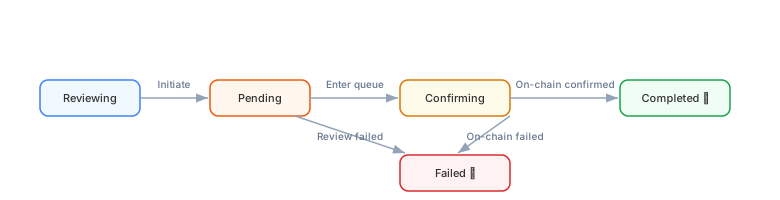
Payout status flow (click to enlarge)
In-platform payout (Transfer) is off-chain and has no
Confirming (block confirmation) stage — it completes in real time once validation passes.Exception Handling
Insufficient Balance
When initiating a payout, if the available balance is insufficient (on-chain withdrawals also require fees), the API will return an error. Please ensure the wallet has sufficient available balance.Risk Control Interception
When an on-chain withdrawal is intercepted by risk control rules, the status changes to Failed, and the frozen funds are automatically released. The Webhook notification contains the specific failure reason. Common interception reasons:- Recipient address is not on the allowlist
- Single transaction amount exceeds the limit
- AML rule triggered
On-Chain Failure (on-chain payouts only)
In rare cases, the withdrawal fails on-chain (e.g., insufficient gas, contract exception). The NUSDpay system will automatically retry or mark the transaction as failed and release the frozen NUSD funds. In-platform payouts (Transfer) are off-chain and not subject to this type of exception.Webhook Not Received
If Webhook delivery fails (timeout or non-200/201 response), the system automatically retries up to 10 times. We recommend:- Ensure the Webhook endpoint responds within 2 seconds
- Use
request_idfor idempotent handling - Periodically call the Transaction Records API as a reconciliation fallback
Next Steps
Payin Solution
Learn how to receive cryptocurrency deposits from customers.
Transfer Solution
Learn how to move funds between a merchant’s own project wallets.