

Page Overview
Merchant Balance Card
The top of the page shows the currently available balance:Settlement History Table
Filter Conditions
Status Flow
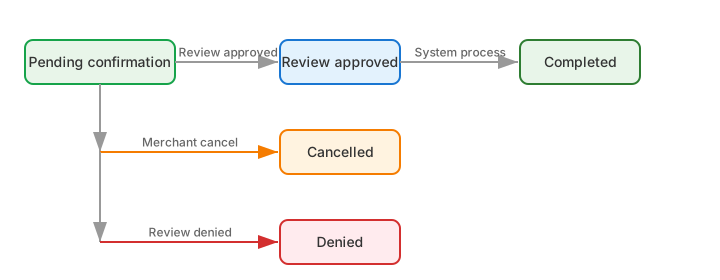
Operation Guide
Initiate Settlement (Admin (Payin) Role)
1
Click the 'Settle' button
Click the “Settle” button at the top right of the page to open the settlement dialog.
2
Select settlement currency
Defaults to USD; currently only USD is supported.
3
Select bank account
Select a receiving account from the list of approved bank accounts.
4
Enter settlement amount
Enter the amount of NUSD to settle. Click the “Available Balance” number to auto-fill with the entire balance.
5
Get verification code
Click “Get Code”. The system will send a verification code to the registered email.
6
Enter the code and submit
Enter the verification code and click OK. The settlement request enters the “Pending Confirmation” state.
Review Settlement (Super Admin)
1
Find the pending settlement
In the settlement history table, find the record with status “Pending Confirmation”.
2
Click the 'Review' button
Click the “Review” button in the action column to open the review dialog.
3
Select review result
Choose “Approve” or “Reject” and click OK.