

Page Overview
Transfer Records Table
Filter Conditions
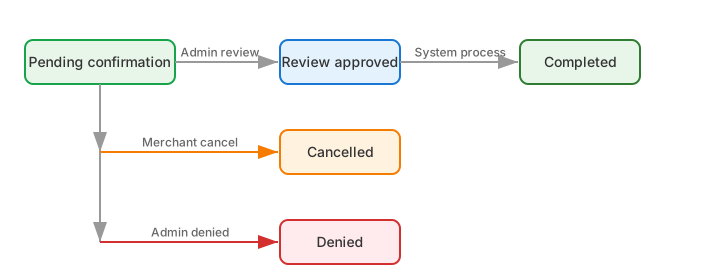
Status Flow
Operation Guide
Initiate Transfer
1
Click the 'Transfer' button
Click the “Transfer” button at the top right of the page to open the transfer dialog.
2
Select target wallet
Select the target project wallet to receive the funds from the dropdown.
3
Enter transfer amount
Enter the NUSD amount to transfer.
4
Get verification code and submit
Obtain the email verification code, enter it, and confirm submission.
Review Transfer (Super Admin)
1
Find the pending transfer
Find a record with the status “Pending Confirmation” in the table.
2
Click the 'Review' button
Click the “Review” button in the action column.
3
Select review result
Choose “Approve” or “Reject” and click OK.